
How to Choose the Right Ecommerce Platform for Your Business (2026)

Mamunur Rahsid
18–27 minutes
Human Written
Choosing an ecommerce platform is not only about picking software.
It is about choosing the system your business will depend on for products, payments, checkout, shipping, tax, SEO, analytics, customer experience, and growth.
That is why the best ecommerce platform is not always the most popular one.
It is the one that fits your use case.
A business selling physical products online may need a different platform than a WordPress user, a creative brand, a local retail store, a B2B business, or a marketplace founder.
The easiest way to choose the right ecommerce platform is to match your platform to five things:
your business model, technical capacity, payment needs, growth plan, and total cost after launch.
In this guide, I will explain how to choose the right ecommerce platform based on your use case, business model, features, budget, technical needs, scalability, and long-term growth plan.
TL;DR: How to Choose the Right Ecommerce Platform
To choose the right ecommerce platform, start with your use case.
If you want a traditional online store with a large app ecosystem, Shopify is a common choice.
If you already use WordPress and want more control, WooCommerce may fit.
If you want a simple visual website, Wix or Squarespace can work.
If you sell both in person and online, Square Online may be a good option.
If you want a no-code, cloud-hosted platform for online stores and multi-vendor marketplaces, FlyCommerce is a strong fit.
Here is the quick version:
| Use case | Best platform to consider |
|---|---|
| Online stores and multi-vendor marketplaces | FlyCommerce |
| Traditional online stores | Shopify |
| WordPress users | WooCommerce |
| Design-focused stores and creative brands | Squarespace |
| Drag-and-drop customization | Wix |
| In-person and online sales | Square Online |
| Growing catalogs and mid-market ecommerce | BigCommerce |
| Enterprise ecommerce | Salesforce Commerce Cloud or Adobe Commerce |
After that, compare platforms by hosting, setup, payments, shipping, tax, SEO, analytics, marketplace features, total cost, support, and scalability.
Quick Answer: Which Ecommerce Platform Should You Choose?
There is no single best ecommerce platform for every business.
The right choice depends on what you are building, how your team works, and how much technical responsibility you want to manage.
Choose FlyCommerce if you want an online store or multi-vendor marketplace
FlyCommerce is a strong option if you want a no-code, cloud-hosted ecommerce platform that supports both online stores and multi-vendor marketplaces.
It is built for businesses that want to launch and manage ecommerce without handling hosting, servers, plugin maintenance, or technical setup.
FlyCommerce is especially useful if you want:
- A hosted ecommerce platform
- No-code storefront building
- Online store and marketplace support
- Product, order, payment, shipping, tax, SEO, analytics, and reporting workflows
- Vendor onboarding, seller dashboards, commission rules, vendor plans, payouts, and marketplace reporting
Best for: store owners, DTC brands, SMBs, agencies, marketplace founders, and teams that want ecommerce operations in one managed platform.
Choose Shopify if you want a traditional online store
Shopify is one of the most widely used ecommerce platforms for traditional online stores.
It is a strong default choice for many businesses selling physical products online because it offers a hosted setup, themes, checkout tools, payment options, sales channels, and a large app ecosystem.
But Shopify is not automatically the best choice for every business.
If you need built-in marketplace workflows or want a cloud-hosted platform that supports both online stores and multi-vendor marketplaces, FlyCommerce may be a better fit.
Best for: businesses selling physical products online through a traditional store model.
Choose WooCommerce if you already use WordPress
WooCommerce is a strong option if you already use WordPress and want more control over your ecommerce setup.
It gives flexibility, SEO control, and a large plugin ecosystem.
The trade-off is that you usually need to manage hosting, WordPress updates, plugin compatibility, security, performance, and maintenance.
Best for: WordPress users, content-led businesses, and teams that want self-hosted flexibility.
Choose Squarespace if design matters most
Squarespace is a good fit for visual brands, creators, portfolio-led businesses, and small stores that care about design.
It works best when the catalog is simple and the business does not need complex ecommerce operations.
Best for: creative brands, lifestyle businesses, and small visual storefronts.
Choose Wix if you want drag-and-drop design freedom
Wix is useful for beginners and small businesses that want a flexible visual website builder with ecommerce features.
It is simple to use, but may not be the best fit for complex catalogs, marketplaces, or advanced ecommerce workflows.
Best for: simple stores, local businesses, and users who want easy visual editing.
Choose Square Online if you sell in person and online
Square Online is a good option for businesses already using Square POS.
It helps connect offline and online selling, which can be useful for local retailers, restaurants, service businesses, and small physical stores.
Best for: brick-and-mortar businesses that want online selling connected with in-person payments.
Choose BigCommerce if you need more built-in ecommerce depth
BigCommerce is often used by growing brands and mid-market businesses that need strong ecommerce features, flexible integrations, and support for larger catalogs.
It may feel more complex than beginner-focused platforms, but it can support more advanced ecommerce needs.
Best for: growing online stores, larger catalogs, and teams that need more built-in ecommerce functionality.
Choose Salesforce Commerce Cloud or Adobe Commerce for enterprise ecommerce
Enterprise commerce platforms are built for larger businesses with complex requirements.
They can support advanced workflows, larger teams, custom integrations, B2B needs, personalization, and multi-region operations.
The trade-off is cost and complexity.
Best for: enterprise teams with larger budgets, technical resources, and advanced commerce requirements.
Why the Right Platform Depends on Your Use Case
Many businesses make the same mistake.
They ask:
What is the best ecommerce platform?
A better question is:
What is the best ecommerce platform for my business model?
That difference matters.
A simple product store needs product pages, checkout, payments, shipping, tax, orders, SEO, and analytics.
A multi-vendor marketplace needs all of that plus vendor onboarding, seller dashboards, commission rules, vendor subscription plans, product approval, payouts, and marketplace reporting.
A local retail store may need POS integration.
A WordPress business may care more about content, plugins, and SEO control.
A creative brand may care more about visual design.
A B2B business may need custom pricing, invoices, tax exemption, bulk ordering, and account-based workflows.
So the right ecommerce platform is not only a tool for building pages.
It is the operating system for how your ecommerce business works.
For a broader foundation, read: What Is Ecommerce and How Does It Work?
Best Ecommerce Platforms by Business Need
Here is a clearer breakdown by use case.
| Business need | Platform to consider | Why it fits |
|---|---|---|
| Build an online store without technical setup | FlyCommerce | No-code, cloud-hosted ecommerce setup |
| Build a multi-vendor marketplace | FlyCommerce | Vendor workflows are available inside the platform |
| Sell physical products through a traditional online store | Shopify | Mature store builder and large app ecosystem |
| Add ecommerce to a WordPress site | WooCommerce | Strong WordPress and plugin flexibility |
| Build a visual storefront | Squarespace | Clean templates and strong design experience |
| Customize pages visually | Wix | Drag-and-drop website editing |
| Sell in person and online | Square Online | Works well with Square POS |
| Run a larger or growing ecommerce catalog | BigCommerce | Strong built-in ecommerce features |
| Manage enterprise commerce | Salesforce Commerce Cloud or Adobe Commerce | Advanced enterprise capabilities |
This table should not be treated as a universal winner list.
It is a starting point.
The best choice still depends on your budget, technical capacity, region, payment needs, growth plan, and business model.
Ecommerce Platform Comparison Table
| Platform | Best for | Main strength | Main limitation |
|---|---|---|---|
| FlyCommerce | Online stores and multi-vendor marketplaces | Store and marketplace workflows in one hosted platform | Newer SaaS brand, so region-specific payment and advanced custom needs should be verified |
| Shopify | Traditional online stores | Mature ecosystem and large app marketplace | Marketplace workflows usually need apps or custom work |
| WooCommerce | WordPress users | Strong control and WordPress flexibility | More hosting, plugin, update, and maintenance responsibility |
| Squarespace | Creative brands | Clean visual templates | Less suitable for complex ecommerce operations |
| Wix | Simple stores and beginners | Easy drag-and-drop editing | Limited for advanced ecommerce and marketplace workflows |
| Square Online | In-person and online selling | POS and online sales connection | Less flexible for complex ecommerce models |
| BigCommerce | Growing and mid-market stores | Strong built-in ecommerce features | May feel complex for beginners |
| Salesforce Commerce Cloud | Enterprise teams | Enterprise commerce and CRM ecosystem | Expensive and complex for smaller businesses |
| Adobe Commerce | Larger technical teams | Deep customization potential | Requires more technical resources |
How to Choose the Right Ecommerce Platform Step by Step
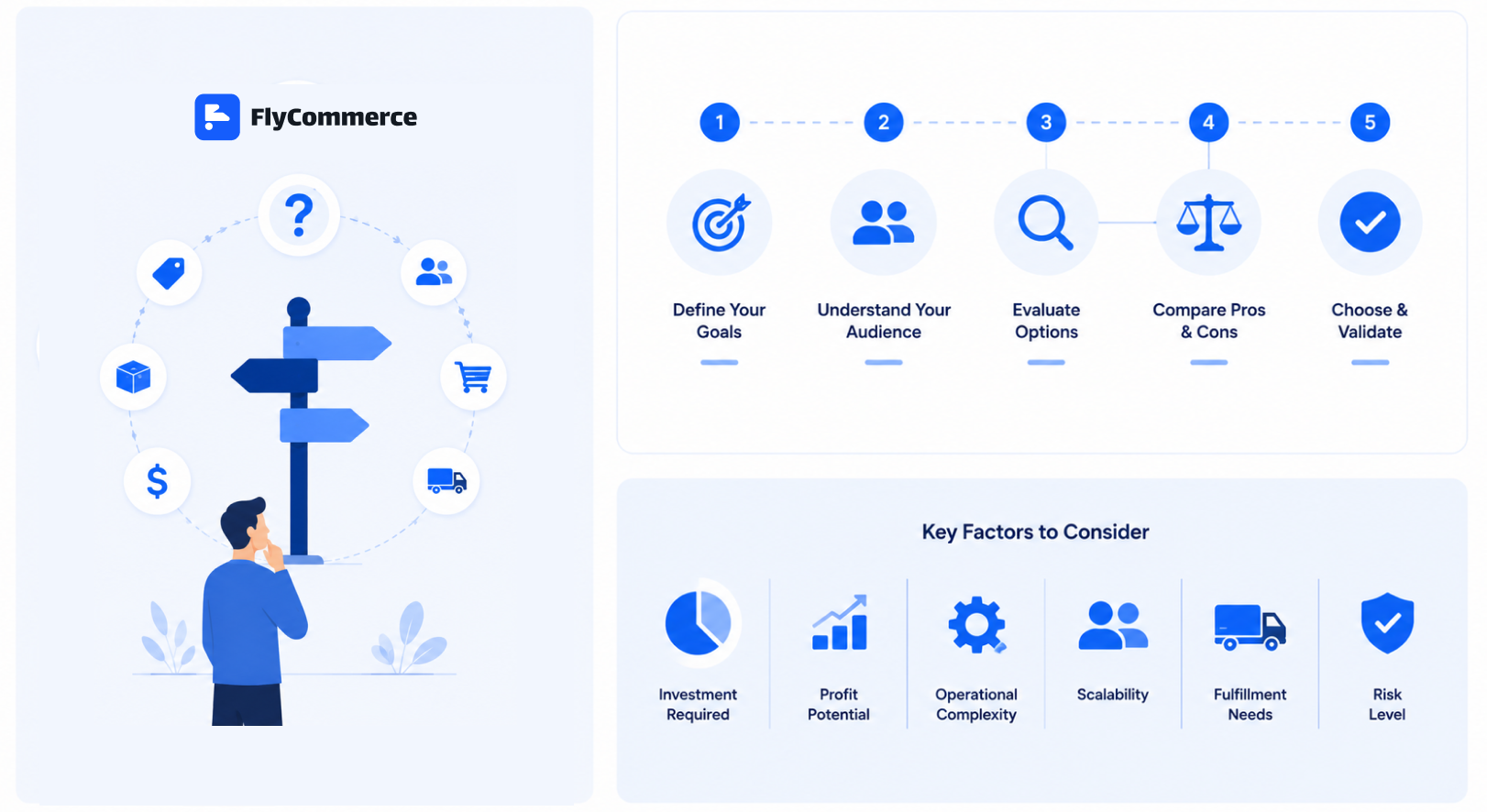
Once you understand the use-case fit, use this framework to make the final decision.
The goal is not to find the platform with the most features.
The goal is to find the platform that supports your business model, reduces unnecessary friction, and gives you enough room to grow.
Step 1: Start With Your Business Model
Your business model should guide the platform choice.
Ask yourself:
What am I trying to build?
| Business model | What the platform needs to support |
|---|---|
| B2C online store | Product pages, checkout, payments, shipping, tax, promotions, and analytics |
| DTC brand | Branded storefront, customer data, SEO, marketing, retention, and reporting |
| B2B ecommerce | Bulk ordering, custom pricing, tax exemption, invoices, and account workflows |
| Digital product business | Digital delivery, secure access, licensing, or downloadable products |
| Subscription business | Recurring billing, customer accounts, and subscription management |
| Marketplace | Vendor onboarding, seller dashboards, commissions, payouts, and marketplace reporting |
| Local business moving online | Simple setup, local payments, pickup, delivery, and easy product management |
A traditional online store and a marketplace are not the same thing.
A store owner manages products and customers.
A marketplace owner manages sellers, buyers, commissions, product quality, payouts, and marketplace rules.
Choose a platform based on how your business operates, not only how the homepage looks.
For more context, read: Types of Ecommerce Business Models Explained
Step 2: Decide How Much Technical Work You Want to Manage
The next decision is technical responsibility.
Do you want the platform provider to manage hosting, updates, security, and infrastructure?
Or do you want to manage those things yourself?
| Platform setup | Best for | Main advantage | Main trade-off |
|---|---|---|---|
| Hosted ecommerce | Founders, small businesses, DTC brands, agencies, and teams that want less technical work | Faster setup and lower maintenance | Less backend control |
| Self-hosted ecommerce | Technical teams, custom projects, and businesses that need deep control | More flexibility and ownership | More setup and maintenance responsibility |
| SaaS ecommerce | Businesses that want cloud-based software through a subscription or platform pricing model | Managed infrastructure and easier access | Platform rules and limits |
| Open-source ecommerce | Teams that want code flexibility | More customization control | Higher technical responsibility |
For most beginners and small businesses, hosted SaaS ecommerce is usually the easier starting point.
For technical teams that need deep customization, self-hosted or open-source ecommerce may be better.
For a deeper breakdown, read: Hosted vs Self-Hosted Ecommerce: Which Platform Setup Is Right for You?
Step 3: Check Storefront and Design Flexibility
Your storefront is what customers see first.
It should help people understand your brand, browse products, trust the business, and complete purchases easily.
Check whether the platform supports:
- Professional themes or templates
- Mobile-responsive design
- No-code page builder
- Custom domain support
- Homepage customization
- Product page customization
- Category page flexibility
- Navigation and menu control
- Product images and videos
- Fast page loading
- Clean checkout experience
Do not choose a platform only because the demo looks good.
Ask whether you can actually customize the store the way your business needs.
A good ecommerce platform should let you create a professional storefront without depending on developers for every basic change.
Step 4: Review Product Management Features
Product management becomes more important as the store grows.
A store with 10 products may be easy to manage manually.
A store with hundreds or thousands of products needs better systems.
Check whether the platform supports:
- Physical products
- Digital products
- Product variations
- Product categories
- Product collections
- Product attributes
- Product reviews
- Inventory management
- Bulk editing
- CSV import and export
- Product SEO fields
- Product images and media
- Product availability rules
Weak product management creates messy catalogs, slow workflows, poor product pages, and more manual work.
A good platform should make it easier to add, organize, update, optimize, and manage products as the business grows.
Step 5: Check Checkout and Payment Options
Checkout is where revenue happens.
A platform may look good, but if checkout is weak, sales will suffer.
Review:
- Payment gateway options
- Local payment methods
- Digital wallets
- Buy now, pay later support
- Multi-currency support
- Checkout customization
- Coupon support
- Order confirmation
- Payment security
- Refund workflows
- Transaction fees or revenue share
- Third-party payment rules
Payment needs depend on your market.
A US-focused store may need cards, PayPal, Apple Pay, Google Pay, or buy now, pay later options.
A Bangladesh-focused store may need bKash or SSLCOMMERZ.
An India-focused store may need Razorpay.
An Africa-focused store may need Paystack.
A marketplace may also need payout workflows for vendors.
Do not choose a platform before confirming that it supports the payment methods your customers actually use.
Payment flexibility can directly affect conversion.
Step 6: Review Shipping, Delivery, and Fulfillment Support
Shipping is one of the hardest parts of ecommerce operations.
Before choosing a platform, check how it handles delivery workflows.
Look for:
- Flat-rate shipping
- Weight-based shipping
- Location-based shipping
- Free shipping rules
- Shipping zones
- Delivery estimates
- Carrier integrations
- Pickup or local delivery options
- Tracking support
- Return and refund workflows
- Fulfillment integrations
A simple store may only need basic shipping rules.
A growing store may need shipping rules by region, weight, order value, product type, or delivery method.
A weak shipping setup can create abandoned carts, support tickets, refund requests, and unhappy customers.
Choose a platform that can support the way your orders will actually be delivered.
Step 7: Check Tax and Compliance Workflows
Tax should not be an afterthought.
Ecommerce tax rules can vary by country, state, product type, customer type, and order value.
Before choosing a platform, check whether it supports:
- Tax settings
- Regional tax rules
- VAT or sales tax workflows
- Tax calculation
- B2B tax exemption handling if needed
- Tax reporting support
- Integration with tax automation tools
- Product-level tax rules
Manual tax setup may work for a very small store.
But as the business grows, tax calculation becomes harder.
This is especially true for businesses selling across multiple regions or serving both B2C and B2B customers.
Important note: tax requirements vary by location and business structure. This section is general information, not legal or tax advice. A qualified tax professional should review your specific situation.
Step 8: Look at SEO, Content, and Marketing Tools
A store does not grow just because it exists.
You need traffic, visibility, and repeat customers.
That is why ecommerce SEO and marketing features matter.
Check whether the platform supports:
- Editable meta titles and descriptions
- Clean URLs
- Product SEO fields
- Category SEO fields
- XML sitemaps
- Social sharing settings
- Blog or content publishing
- Coupons and promotions
- Email marketing integrations
- Analytics integrations
- Retargeting and tracking pixels
- Abandoned cart recovery
- Product reviews
- Structured data support if available
A platform with weak SEO controls can make organic growth harder.
A platform with limited marketing tools may force you to depend on more apps earlier than expected.
The best ecommerce platform should help you launch the store and support growth after launch.
Step 9: Review Analytics and Reporting
Without analytics, you are guessing.
A good ecommerce platform should help you understand what is happening inside the business.
Check for:
- Sales reports
- Order reports
- Product performance
- Customer behavior
- Traffic sources
- Conversion tracking
- Coupon performance
- Inventory insights
- Vendor-level reporting if you run a marketplace
- Google Analytics 4 integration
- Exportable reports
Analytics help you answer important questions:
- Which products are selling?
- Which products are getting views but not sales?
- Which traffic channels are working?
- Where are customers dropping off?
- Which campaigns are driving revenue?
- Which vendors are performing well?
- What should you improve next?
A platform that gives clear reporting can help you make better business decisions.
Step 10: Review Marketplace Features if You Need Vendors
This step is critical if you want to build a marketplace.
Many ecommerce platforms are built for one seller.
That does not automatically make them suitable for a multi-vendor marketplace.
A marketplace platform needs:
- Vendor registration
- Vendor approval workflows
- Seller dashboards
- Vendor product management
- Vendor order management
- Commission rules
- Vendor subscription plans
- Product limits
- Payout workflows
- Vendor-level reporting
- Seller verification
- Marketplace performance tracking
- Admin control over seller activity
Marketplace operations are not simple add-ons.
They are a different business model.
If your platform does not support marketplace workflows natively, you may need third-party apps, plugins, custom development, or manual workarounds.
That can increase cost and complexity as the marketplace grows.
Step 11: Understand the Full Cost, Not Just the Starting Price
The cheapest starting price is not always the lowest total cost.
When comparing ecommerce platforms, calculate the full cost of ownership.
Review:
| Cost area | What to check |
|---|---|
| Platform subscription | Monthly, yearly, or enterprise pricing |
| Revenue share | Percentage of sales paid to the platform if applicable |
| Transaction fees | Extra platform fees for certain payment methods |
| Payment processing | Gateway or processor fees |
| Apps and extensions | Paid tools needed for key features |
| Themes | Free or paid storefront themes |
| Hosting | Included or paid separately |
| Domain | Usually paid separately |
| Development | Setup, customization, and technical work |
| Maintenance | Updates, bug fixes, security, and performance |
| Migration | Moving from another platform |
| Support | Standard, priority, agency, or enterprise support |
A platform may look affordable at first but become expensive when you add apps, development, payment fees, and maintenance.
A platform may look more expensive but include more of what you need from the start.
The better question is not:
What is the lowest starting price?
The better question is:
What will this platform cost after the store is live and growing?
For a full cost breakdown, read: How Much Does an Ecommerce Website Cost?
Step 12: Check Scalability and Long-Term Fit
Do not only choose for today.
Choose for the business you are trying to build.
Ask:
- Can the platform handle more products?
- Can it support more orders?
- Can it support more staff users?
- Can it support more regions?
- Can it support more payment methods?
- Can it support B2B needs?
- Can it support marketplace vendors?
- Can it support SEO growth?
- Can it support larger campaigns?
- Can it support reporting as the business grows?
- Can it support migration if needed?
A platform that fits your first month but fails in your second year can create expensive rework.
You do not need to overbuy from day one.
But you should choose a platform with enough room to grow.
Step 13: Review Support, Security, and Maintenance
Support and maintenance matter more than many beginners expect.
When something breaks, you need to know who is responsible.
Check:
- Who manages hosting?
- Who manages platform updates?
- Who handles security patches?
- Is support included?
- What support channels are available?
- Is there documentation?
- Is there onboarding help?
- What happens during checkout issues?
- What happens if an integration breaks?
- What happens during traffic spikes?
For hosted platforms, the provider usually manages more of the technical foundation.
For self-hosted setups, you may depend on hosting support, plugin support, developers, agencies, or community forums.
A platform is not only a tool.
It is an operating partner.
Choose one that matches your support needs.
Ecommerce Platform Selection Checklist
Use this checklist before choosing a platform.
| Question | Why it matters |
|---|---|
| What business model am I building? | Different models need different workflows |
| Is this an online store or marketplace? | Marketplaces need vendor operations |
| Do I want hosted or self-hosted ecommerce? | This affects maintenance and control |
| Can I customize the storefront easily? | Design and conversion depend on it |
| Can I manage products efficiently? | Catalog workflows affect daily operations |
| Are the right payment gateways supported? | Checkout friction affects sales |
| Can I configure shipping properly? | Delivery experience affects customer satisfaction |
| Can I manage tax workflows? | Tax mistakes can create risk |
| Are SEO tools included? | Organic growth depends on visibility |
| Are analytics and reports available? | You need data to improve performance |
| Does it support marketplace workflows if needed? | Store builders are not always marketplace-ready |
| Does it support my future growth? | Replatforming later can be costly |
| What is the full cost after launch? | Starting price is not the whole cost |
| Who handles maintenance and security? | Technical responsibility affects workload |
| What support is available? | Problems will happen, support matters |
Common Mistakes to Avoid When Choosing an Ecommerce Platform

Choosing an ecommerce platform is easier when you know what to avoid.
Mistake 1: Choosing Only Based on Popularity
The most popular platform is not always the right platform for your business.
A platform may be popular for traditional stores but weak for marketplace workflows.
Another platform may be strong for enterprise teams but too complex for beginners.
Choose based on fit, not fame.
Mistake 2: Looking Only at the Starting Price
The starting price can be misleading.
You also need to check apps, transaction fees, revenue share, payment processing, themes, hosting, development, support, and maintenance.
Total cost matters more than the headline price.
Mistake 3: Ignoring Payment Gateway Fit
A platform that does not support your customers’ preferred payment methods can hurt conversion.
Always check payment gateway support by region before choosing.
Mistake 4: Forgetting SEO
Some platforms make it harder to manage URLs, metadata, sitemaps, schema, site speed, and content.
SEO should be part of the platform decision, not an afterthought.
Mistake 5: Choosing a Store Builder for a Marketplace
A marketplace is not just a bigger online store.
It needs vendor onboarding, seller dashboards, commission rules, payouts, vendor plans, and marketplace reporting.
If you need a marketplace, choose a platform that supports marketplace workflows properly.
Mistake 6: Ignoring Maintenance Responsibility
A self-hosted platform can give more control, but it also needs more maintenance.
Be honest about your team’s technical capacity before choosing.
Mistake 7: Choosing Only for the First Month
Your business will change.
You may add more products, vendors, payment methods, regions, campaigns, staff users, or reporting needs.
Choose a platform that can support your next stage, not only your first launch.
How FlyCommerce Fits Into This Decision
FlyCommerce is a no-code, cloud-hosted SaaS ecommerce platform for businesses that want to build online stores or multi-vendor marketplaces without managing hosting, servers, plugins, or technical maintenance.
It fits businesses that want a managed ecommerce platform with fewer technical barriers.
FlyCommerce supports two ecommerce paths:
| FlyCommerce path | Best for | What it helps you build |
|---|---|---|
| FlyCommerce Shop | Store owners, DTC brands, SMBs, first-time sellers, and digital product sellers | A professional online store |
| FlyCommerce Marketplace | Marketplace founders, agencies, B2B teams, and marketplace operators | A multi-vendor marketplace |
FlyCommerce is a strong fit if you want:
- A hosted ecommerce platform
- No-code storefront building
- No hosting or plugin maintenance
- Product, order, payment, shipping, tax, SEO, analytics, and reporting workflows in one place
- AI support for product content workflows
- Marketplace support when you need vendors
- Vendor onboarding, dashboards, commissions, vendor plans, payouts, and marketplace reporting
- A simpler way to launch, sell, and grow from one managed platform
The biggest value is not only that FlyCommerce helps you build a store.
It helps you manage the ecommerce system behind the store.
That is useful for businesses that do not want to assemble their ecommerce stack piece by piece.
To learn more, read: What Is FlyCommerce and How Does It Work?
Final Verdict: How Should You Choose?
The right ecommerce platform depends on what you are building.
Choose FlyCommerce if you want a no-code, cloud-hosted ecommerce platform that supports both online stores and multi-vendor marketplaces.
Choose Shopify if you want a mature ecommerce platform for a traditional online store with a large app ecosystem.
Choose WooCommerce if you already use WordPress and want more control over your ecommerce setup.
Choose Squarespace if you want a clean, visual storefront for a creative brand or small shop.
Choose Wix if you want drag-and-drop design freedom for a simple ecommerce website.
Choose Square Online if you already sell in person and want to connect online selling with POS.
Choose BigCommerce if you need stronger built-in ecommerce features for a growing catalog.
Choose Salesforce Commerce Cloud or Adobe Commerce if you need enterprise-level commerce capabilities and have the budget and technical resources to support them.
The best ecommerce platform is the one that fits your business model, supports your operations, stays manageable as you grow, and helps you focus on selling instead of fighting the technical setup.
To move from platform research to launch planning, read: How to Start an Online Store from Scratch
FAQs About Choosing the Right Ecommerce Platform
How do I choose the right ecommerce platform?
Start with your business model, then compare platforms based on hosting, design flexibility, product management, payments, shipping, tax, SEO, analytics, maintenance, scalability, marketplace features, and total cost. The best platform should fit how your business sells and how your team works.
What is the best ecommerce platform for most businesses?
There is no single best platform for every business. Shopify is commonly used for traditional online stores, WooCommerce is strong for WordPress users, Wix and Squarespace work well for simple visual sites, Square Online fits businesses using Square POS, and FlyCommerce is a strong fit for online stores and multi-vendor marketplaces.
What is the most important thing to consider when choosing an ecommerce platform?
The most important thing is use-case fit. A platform should support your business model, technical capacity, budget, operations, payment needs, SEO goals, and growth plan.
What is the most important thing to consider when choosing an ecommerce platform?
The most important thing is use-case fit. A platform should support your business model, technical capacity, budget, operations, payment needs, SEO goals, and growth plan.
What features should an ecommerce platform have?
A strong ecommerce platform should include storefront customization, product management, checkout, payments, shipping, tax workflows, order management, SEO tools, analytics, reporting, customer support features, and integrations. Marketplace businesses also need vendor workflows.
Is FlyCommerce an ecommerce platform?
Yes. FlyCommerce is a no-code, cloud-hosted SaaS ecommerce platform that helps businesses build online stores and multi-vendor marketplaces without managing hosting, servers, plugins, or ecommerce infrastructure themselves.